
How to ask for premium
Open Profile, tap Request premium access, tell us what you'd use it for and how you'll help, pick a date and send. Needs an account
You need to be signed in. If you're browsing without an account, sign in with Apple first, because a request belongs to your account.
The steps
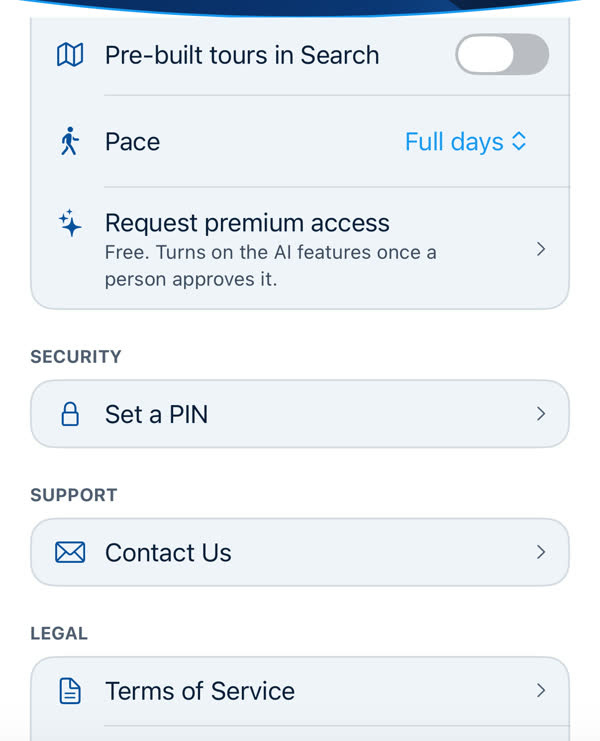
- Open Profile. It's the third tab, at the bottom. Scroll to the App section.
- Tap Request premium access. The row says "Free. Turns on the AI features once a person approves it." If you don't see it, you may already have premium, or a request may be waiting. See What your Premium row says.
-
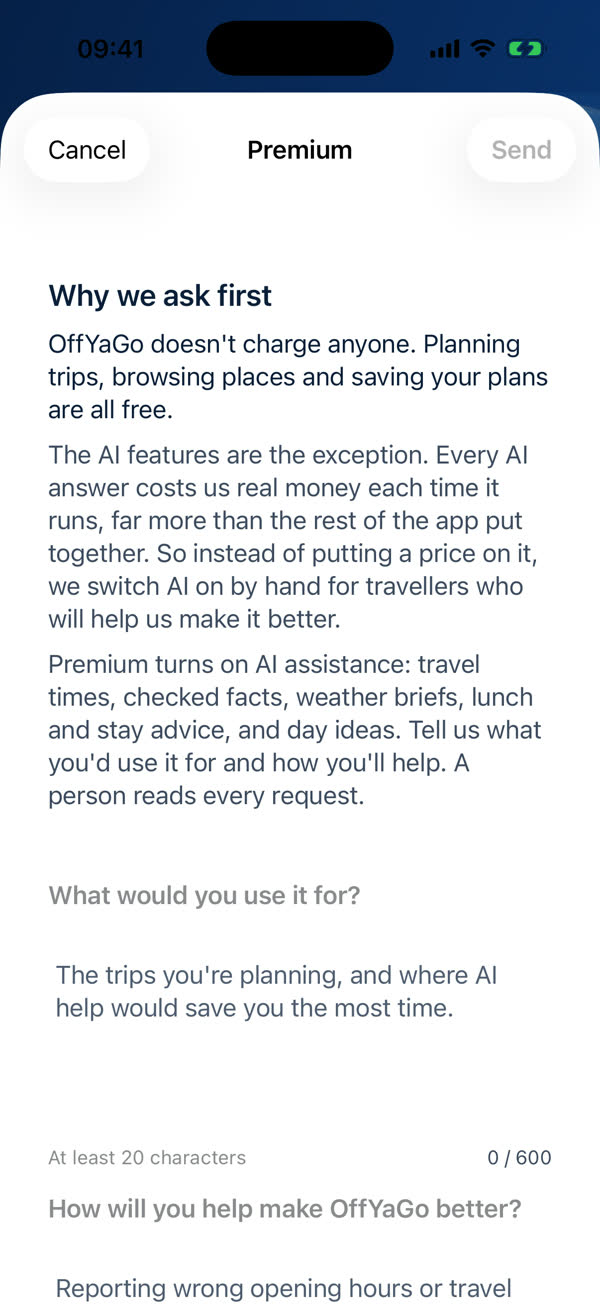
Read "Why we ask first", then answer two questions. Each answer needs at least 20 characters and can be up to 600.
- What would you use it for? The trips you're planning, and where AI help would save you the most time.
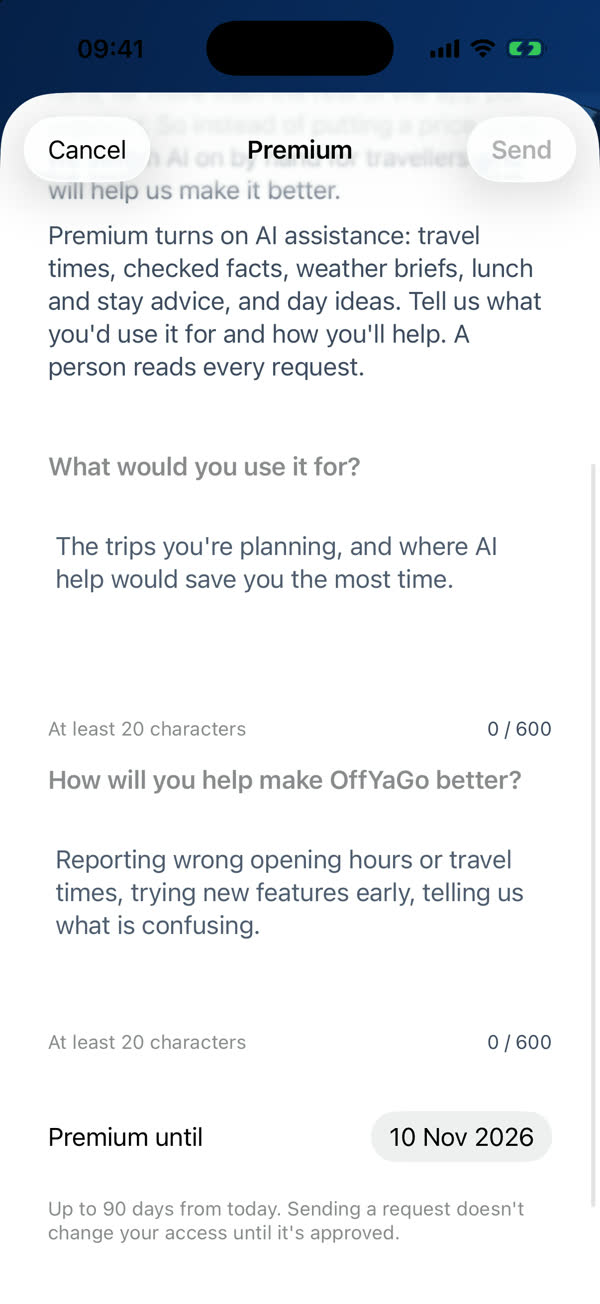
- How will you help make OffYaGo better? For example: reporting wrong opening hours or travel times, trying new features early, telling us what is confusing.
- Pick Premium until. It starts about a month ahead. You can choose any date up to 90 days from today.
- Tap Send. Send stays greyed out until both answers are long enough. The row then reads Request sent — we'll let you know.
Jump to a step
Read the transcript
- This is Profile, the third tab. Everything about your account lives here.
- Scroll down to the App section. Under Pace, you'll find a row called Request premium access. It's free, and it turns on the AI features once a person approves it.
- Tap it. The sheet starts with why we ask first. OffYaGo doesn't charge anyone. But every AI answer costs us real money, so we switch AI on by hand, for travellers who will help us make it better.
- Then there are two questions. What would you use it for, and how will you help make OffYaGo better? Each answer needs at least twenty characters.
- Pick the date you'd like premium until, up to ninety days from today. Sending a request doesn't change anything until a person approves it. When you're ready, tap Send.
- After that, check Profile. A person reads every request. When it's approved, this row will say Premium until your date, and the AI assistance switch appears.
What happens next
- A person reads it. Nothing approves a request automatically. A request that is waiting grants nothing.
- You'll see the answer on Profile. We don't send an email or a notification for this. Open Profile to check.
- If it's approved, the row changes to Premium until and the date. The app picks the approval up when Profile loads. If the row still hasn't changed, close and reopen the app, or sign out and back in.
- If it's not approved, the row says Not approved, shows a note from us if we left one, and offers Request again.
You can have one request waiting. If you try to send another, the app tells you that you already have one waiting for a decision. Wait for the answer, then ask again if you need to.
Writing a good request
There's no right answer, and we're not marking you. We'd like to know the trip you're planning and what you'd tell us when something is off. Short and honest beats long and polished.
When it's turned on
Premium on its own doesn't send anything to an AI provider. After it's approved, go to Profile and turn on AI assistance. See Turning on AI assistance.
If something goes wrong
If Send fails, check your connection and try again. If your request was approved but the row still says Request sent, see Premium isn't showing up.
Something missing or wrong on this page? Tell us. A person reads every message. Updated 11 October 2026.