
See what the AI did and what it cost
A live panel while a run goes, a list in Profile, and a Running cost screen that shows what the app costs to run for you. It's a view, not a bill.
When AI assistance is on, nothing the AI does is hidden. You can see each request, whether it worked, and what the whole app costs to run for you.
While you plan
During an Auto-plan run, a panel lists this run's AI requests live: a spinner while one is going, then a green tick or a red cross and how long it took. Each is named in plain words, such as "Travel times between your areas", "Choosing the order of your cities", "Checking this trip online", "Where to eat", "Ideas for a free day" or "Where to stay".
Only requests that really call an AI are listed. Looking up facts that are already stored, or typical weather, doesn't use a model, so it isn't shown as AI work.
After a run
The Plan screen shows a card with the latest requests of that run. The ✕ hides the card. It doesn't delete anything from Profile.
In Profile
Under the AI switches, Profile lists the last 15 AI requests this session, newest first, with a Clear button. The list starts empty each time you open the app. It isn't a ledger, and nothing in it is sent anywhere. The Running cost screen is the longer record.
Running cost
Profile → Account → Running cost shows this month's figure, such as USD 0.03, as "the bill behind the screens, not a charge to you". Nobody pays it. It's there so you can see what using the app adds up to.
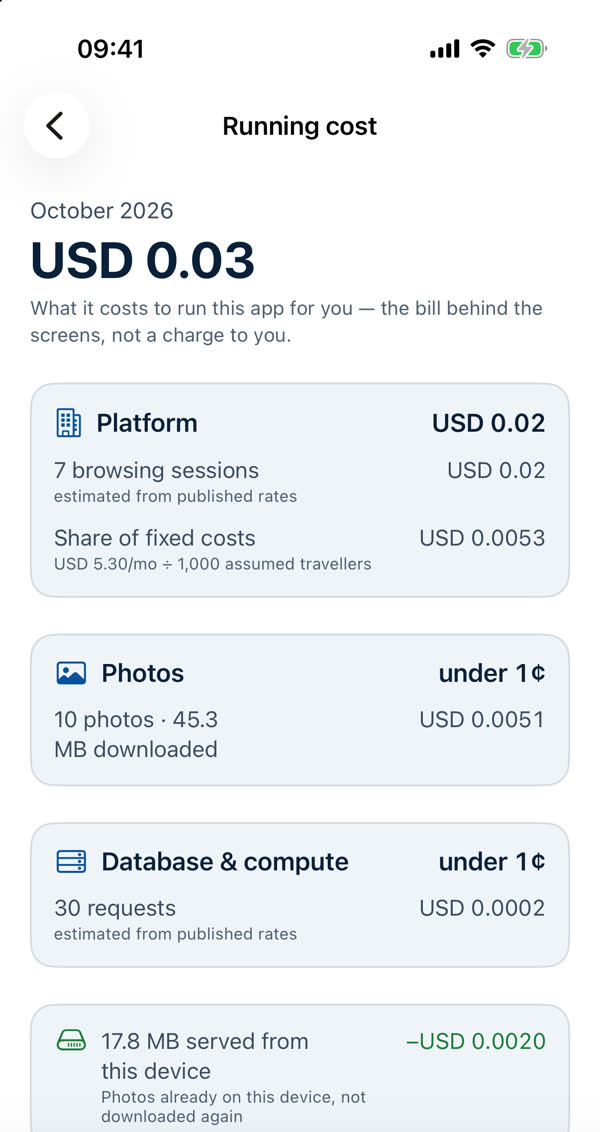
- Every dollar figure sits next to the count it came from, for example "10 photos · 45.3 MB downloaded".
- AI answers have their own lines, priced from what each answer reported.
- Photos already on your phone show as "served from this device", priced at zero.
- Anything under a cent says "under 1¢" rather than a zero amount, which would read as free.
- It resets on the 1st of each month, and the last 12 months are kept as a plain list.
What's kept, and where
The counts are kept on your phone. Each month they're sent to our servers with a random install ID, filed under your signed-in account, never with your name or email or what you searched for. We use them to watch the platform's spending. See the Privacy Policy.
It's an estimate
The figures are counted on your phone and priced from published rates. Free allowances are shared across everyone, so they aren't applied. It shows what one more traveller adds, not a copy of an invoice. See Running cost, line by line for a walk through every line.
Why show all this
AI costs real money every time it runs, and we think you should be able to see that. It's also how fair use stays honest: the limits are there so the cost stays small and the AI stays available to everyone.
Something missing or wrong on this page? Tell us. A person reads every message. Updated 11 October 2026.