
The trip screen, from top to bottom
The ticket, the three steps, the Departures board, How you move, and What this trip already knows, each explained. Needs an account
Open a trip from the Trips tab and you see one long screen. Here's what's on it, in order.
Jump to a step
Read the transcript
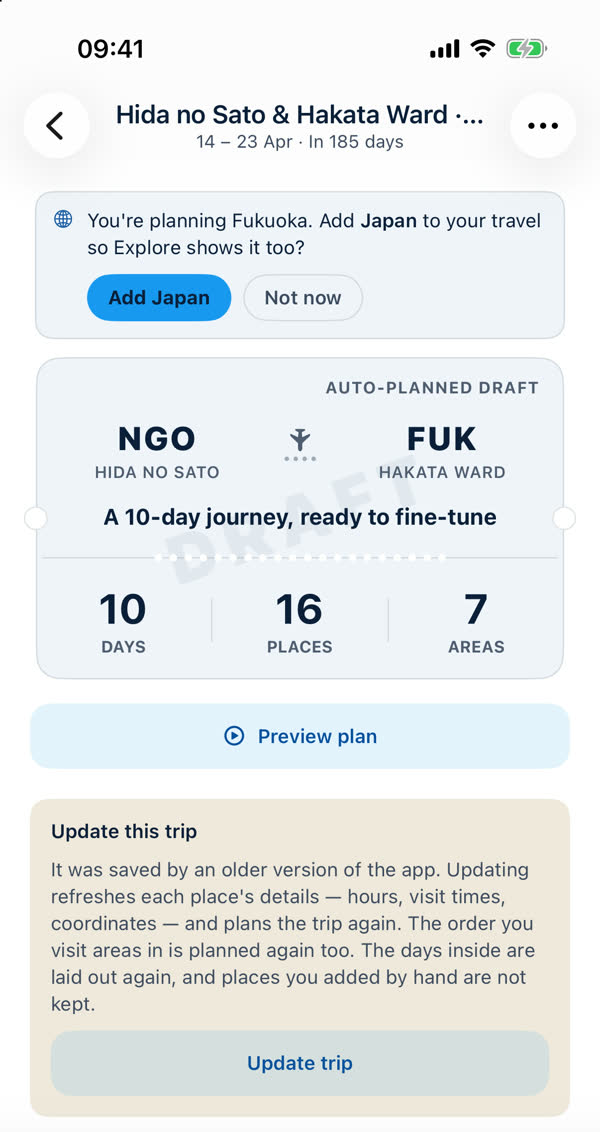
- Open a trip from the Trips tab, and it starts with its ticket. It shows where you start and end, and real counts of the days, the places, and the areas on the trip. A Draft stamp means no schedule has been built yet.
- Below that, three steps: Collect, Plan, and Schedule. When your plan looks right, Build my schedule checks opening hours and travel times, and puts a clock on every stop.
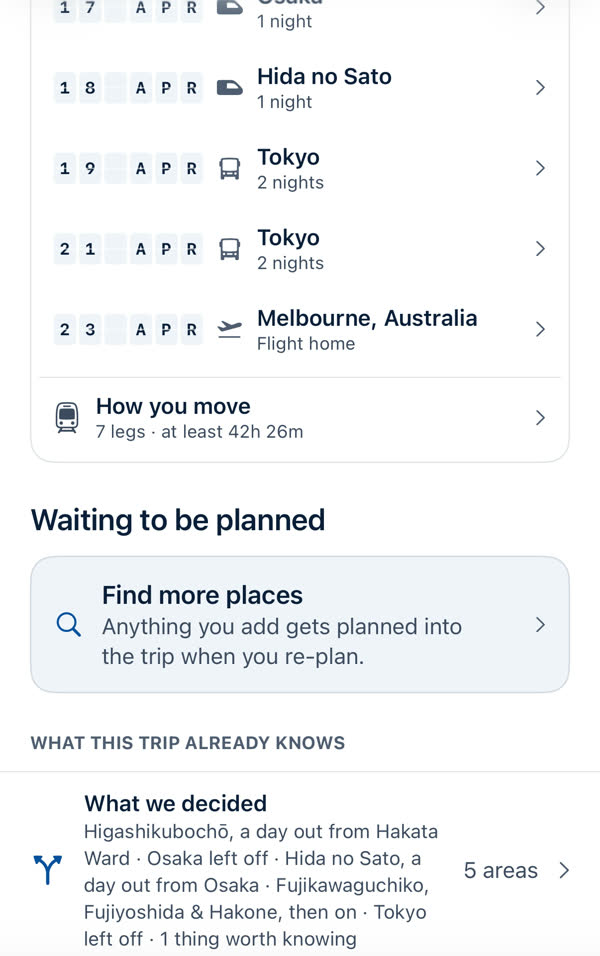
- The Departures board lists each place you sleep, the date you arrive, how you get there, and how many nights you stay.
- How you move adds up every journey. Places you've added but not yet planned wait below, under Waiting to be planned.
- The three dots open the trip menu. Invite mates, rename the trip, change the dates, reorder the areas, or change how many days it runs.
- Preview plan walks you through the days. Day one here is a long flight, so the app plans it as a rest day.
- Swipe for the next day. Your stops are in order, with how long to allow, the walk between them, and lunch in the middle. At the bottom, a note says this isn't a schedule yet, so times are not set.
The ticket
A boarding-pass card: where you start and end (airport codes), the trip's length and a line such as "A 10-day journey, ready to fine-tune". The counts, Days, Places and Areas, are real counts of what's in the trip. A Draft stamp means it hasn't been scheduled yet. A built schedule makes it a proper issued ticket.
Preview plan beneath it walks you through the days. See Reading a day.
The three steps
Collect · Plan · Schedule. A tick shows a step you've finished, and the next-step card under it says what to do now: collect more places, Auto-plan, Re-plan or Build my schedule. See Build your schedule.
Departures
"Where you sleep, and when you move." A board with one row per base: the date, an icon for how you arrive (plane, train, bus), the base and its nights. Tap a row for that base. See Where you sleep. The last row is the flight home.
How you move
A summary row such as "7 legs · at least 42h 26m", which opens every journey on the trip. See How you move.
Waiting to be planned
Places not on a day yet, plus Find more places. See Areas, and what "Waiting to be planned" means.
What this trip already knows
- What we decided lists the plan's choices in words: a day out from a base, an area left off, where the trip moves on. Open it to read why. See Why a place isn't on a day, and why a day looks empty.
- What we checked appears when facts were looked up online. See Check this trip online.
The top bar
The trip's name and dates ("14 – 23 Apr · In 185 days"), a back arrow, and the ••• menu. See Editing a trip.
Something missing or wrong on this page? Tell us. A person reads every message. Updated 11 October 2026.