
From saved places to a trip
Every trip is built from your saved places. Start a trip, add places to it by area, and send one back whenever you change your mind. Needs an account
OffYaGo keeps two things apart on purpose: a library of places you like (Saved places) and the trips you build from it. That lets you hold several trips at once and decide which saved place goes where.
The Trips tab
The Trips tab lists your trips, each with a status chip such as Draft or Ready to schedule, its length and number of places. Under the list, the Saved places row shows how many places you have saved and says what's true right now: "Nothing saved yet", "Every trip is built from these", or "Everything you've saved is on a trip".
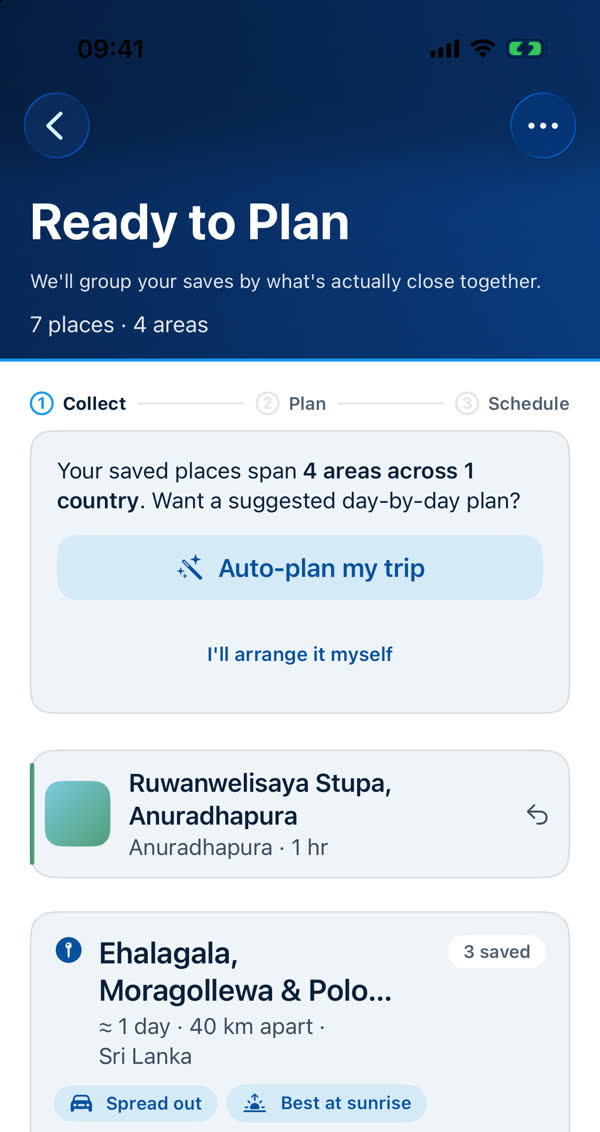
Start a trip
- Save some places first. See Saving places.
- On the Trips tab tap Start a trip (or New trip when you already have one). If it says "Save more places to start another trip", every saved place is already on a trip.
- Open the Saved places list. It's grouped by area. For each place tap Add to <trip>, or tap Add all N on an area to add the whole group.
A place leaves your saved list when you add it to a trip. If you change your mind, you can move it to another trip or send it back.
Inside a trip: "Waiting to be planned"
Places you've added but not yet laid out wait under Waiting to be planned. They're grouped by area. Each row has a button to send it back to Saved places, and a menu to move it to another trip or onto a day. The row Find more places says "Anything you add gets planned into the trip when you re-plan." See Areas, and what "Waiting to be planned" means.
Sending a place back
Use the return button beside a waiting place, or Return saved places in the trip's ••• menu when places are waiting. There's no confirmation, because nothing is lost: it goes back to your saved list.
Next
When the places look right, Auto-plan lays them across days.
Something missing or wrong on this page? Tell us. A person reads every message. Updated 11 October 2026.