
Deleting your account
Delete your account inside the app. We confirm with Apple, erase your account and its data, and revoke OffYaGo's Sign in with Apple access. Needs an account
Deleting your account permanently removes your account, your trips, saved places, trip mate code and premium requests, and removes you from any shared trip.
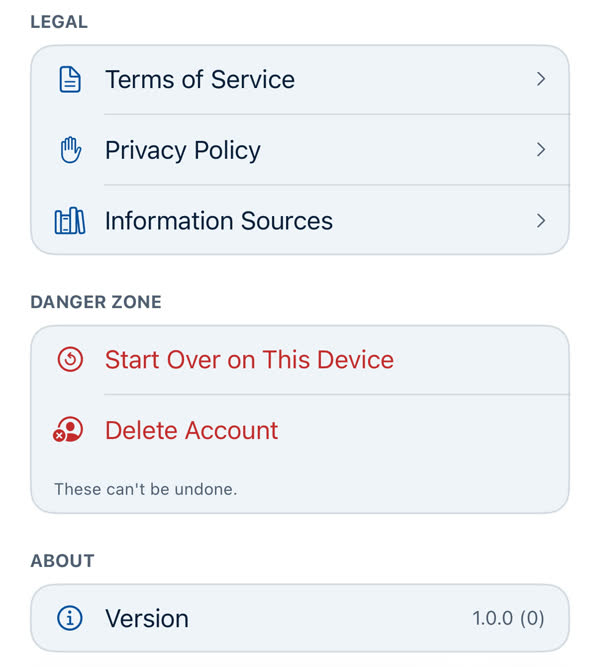
How
- Open Profile and scroll to the bottom. In the Danger Zone, just above the version, tap Delete Account. It's the last row, in red.
- Read the alert, "Delete your account?". It lists exactly what's destroyed and says "You'll be asked to confirm with Apple next." Tap Delete Account.
- Apple's sign-in sheet appears. Confirm with Face ID or your passcode. This proves it's really you.
- The screen says "Deleting your account…". When it's done you're returned to the Welcome screen, signed out.
What's deleted
- Your account and profile.
- Your trips and saved places.
- Your trip mate code, and your place on any shared trip.
- Your premium requests.
- OffYaGo's access to your Apple ID. After deletion, OffYaGo no longer appears under Apple ID → Sign in with Apple in your iPhone's Settings.
- Local data on the phone: your preferences, App Lock and the AI switches.
What may remain
- On shared trips: places you added to someone else's trip remain on it, shown as "A former trip mate", and your name may remain for a short time on a trip mate's notification.
- Usage and crash reports kept by Firebase for a limited time, then deleted.
- Anything the law requires us to keep.
The Privacy Policy sets all this out.
If it doesn't finish
If something fails, the app shows an alert, "Account not deleted", with Try Again and Cancel. Nothing is cleared when it fails, so you're exactly where you were. A retry asks Apple to confirm again. If it keeps failing, write to us and we'll finish it for you. See Contacting us.
If you only want a fresh start on this phone
That's different: Start Over on This Device doesn't delete your account.
Signing up again
You can sign in with Apple again later. It creates a new, empty account.
Something missing or wrong on this page? Tell us. A person reads every message. Updated 11 October 2026.