
Your mate code
A temporary code you make in Profile and read to the friend who's organising. It works for 24 hours, and you can stop it any time. Needs an account
A mate code is how a friend invites you to a trip without any link or username going around. You make it, you hand it over, and it expires.
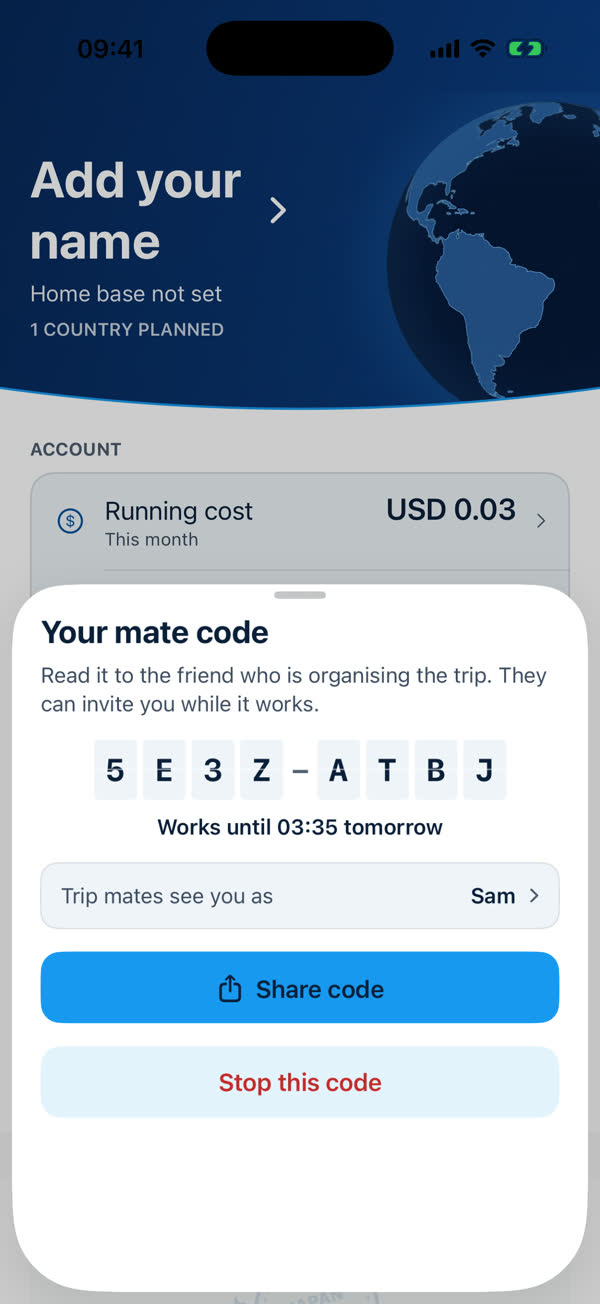
- Open Profile → Account → Mate code. It's between Home Base and Sign Out. The row says "Show".
- Read the code to the organiser. The sheet says "Read it to the friend who is organising the trip. They can invite you while it works." It's eight characters in two groups of four. Below it is when it stops working, such as "Works until 03:35 tomorrow".
- Check the name they'll see. Trip mates see you as shows your mate name, filled in from your Apple given name. Tap it to change. Mates never see your email.
- Optionally tap Share code to send it by message. You can also read it out.
Stopping a code
Stop this code ends it immediately. Do this if you shared it with the wrong person. A code also stops by itself after 24 hours.
Why a code, not a link?
An invitation can only reach someone who has given you a code in the last day, so it can't be sent to a stranger. If you don't want to be invited, don't share your code.
Limits
- A code works for 24 hours.
- An account can try only so many codes an hour. If you enter codes too fast the app says "Too many tries — wait an hour".
See Trip mate limits.
Something missing or wrong on this page? Tell us. A person reads every message. Updated 11 October 2026.