
Reading a place page
What each part of a place's page tells you: the tip, highlights, best time to go, opening hours, the map, and what's around it.
Tap any place card to open its page. Each place is written by hand from open sources, not copied from a review site.
From the top
- The photo and name, with its area and a pill for the kind of place, such as "Views and landmarks". The photo credit sits with it when the licence asks for one.
- How long to allow, for example 2h. The planner uses the same figure when it builds a day.
- The tip. A short, practical line in a pale blue box with a lightbulb. For example: book the stairs ticket, not the lift, for a shorter queue.
- About. A few paragraphs on why the place is worth your time.
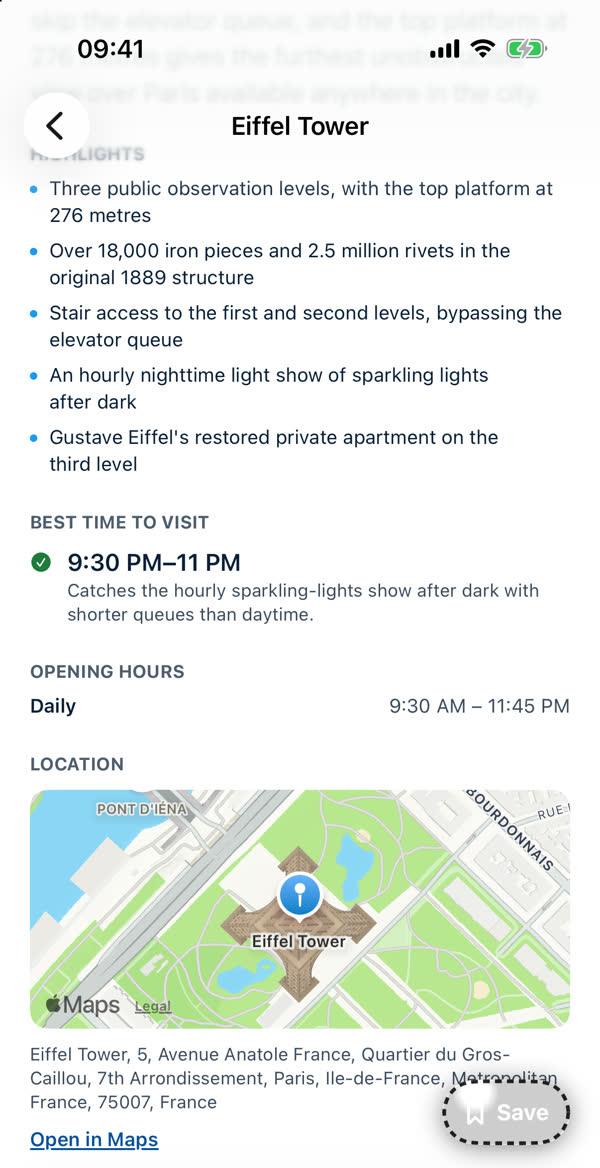
- Highlights. The things to look for.
When to go
- Best time to visit gives a window with a green tick and the reason. It's a recommendation, not a rule.
- Opening hours list the usual hours. Special closures, holidays and renovations aren't in them. With premium you can have the app look those up for your dates. See Check this trip online.
Where it is
- A map with the place pinned, its address, and Open in Maps to carry on in Apple Maps.
- Where Apple has street-level imagery, a Look Around button appears. If it doesn't, nothing is drawn.
Save it
The Save button at the bottom right adds the place to your saved places. See Saving places.
Is it right?
Hours and tips are a guide. Check anything important with the venue, and tell us if something's wrong using Support. See How far to trust AI suggestions.
Something missing or wrong on this page? Tell us. A person reads every message. Updated 11 October 2026.